Sign-in and account (Vendor)
Executive summary
Section titled “Executive summary”Vendor sign-in (/login) and password reset (/forgot-password → /verify-otp → /reset-password) use the NestJS API. The marketing landing page is / (no session). Self-service vendor registration is not exposed in the web app route map for now; vendors are onboarded elsewhere.
Goals and non-goals
Section titled “Goals and non-goals”| Goals | Non-goals |
|---|---|
| Document which routes are public vs protected | Replace Authentication for JWT and infra details |
| Point readers to technical auth for OTP scaling and env | Document out-of-app vendor provisioning processes in full |
Current platform behavior
Section titled “Current platform behavior”/— marketing landing; Sign in only (no public register link in the UI)./login— real vendor login (POST /auth/vendor/login)./forgot-password,/verify-otp,/reset-password— real API-backed reset (details below)./dashboard/*and/pos— protected (ProtectedRoute); require a valid JWT.
Sequence: happy path
Section titled “Sequence: happy path”- User opens
/login→ chooses Owner or Staff on the role toggle → enters email/password →/dashboard(or a deep link after login, depending on product flows). - Password issues →
/forgot-password(OTP + reset) when the account exists.
Sign-in screen (/login): layout and roles
Section titled “Sign-in screen (/login): layout and roles”There is one sign-in route and one form layout. Role is chosen with the shared VendorAuthTypeToggle (labels come from i18n; English E2E uses the Staff and Owner buttons).
| UI role (EN) | Form value vendorType | API vendor_type |
|---|---|---|
| Staff | employee | employee |
| Owner | owner | owner |
Layout (conceptual):
- Left (large viewports): branding / hero copy (
Logo, title, footer links — not the auth form). - Right: Welcome heading → role toggle → Email → Password (with show/hide) → Remember me + link
/forgot-password→ primary Sign in submit.
Behaviour:
- Default form state:
vendorTypedefaults toemployee(Staff) in code; Playwright success tests still click the correct tab before filling credentials so the scenario is explicit. - Already authenticated: when the auth store is hydrated and
accessTokenis set, the page renders<Navigate to="/dashboard" replace />— the user does not see the form. - Client validation (Zod + RHF): invalid email or empty password does not call
POST /api/v1/auth/vendor/login; errors appear next to fields. There must be no API error banner: Playwright expectsform > [role='alert']count 0 (the API banner is a separaterole="alert"block used only for submit/API failures). - API error (e.g. wrong password): after a login
POST, a non-success response is shown in the firstrole="alert"region inside the form; URL stays/login.
Security and operations
Section titled “Security and operations”- Use HTTPS in production; rotate compromised credentials via your operational process.
Routes (public auth)
Section titled “Routes (public auth)”| Route | Behavior |
|---|---|
/ | Marketing landing — not the login form |
/login | Real — vendor sign-in (owner vs staff) |
/forgot-password | Real — POST /api/v1/auth/vendor/password-reset with { email, vendor_type } |
/verify-otp | Real — POST …/password-reset/verify; stores reset_token for next step |
/reset-password | Real — POST …/password-reset/complete; then navigate to /login |
Canonical route map for the full SPA (dashboard, POS, settings labs) lives in Frontend applications — Vendor web — route map.
Sign-in (real)
Section titled “Sign-in (real)”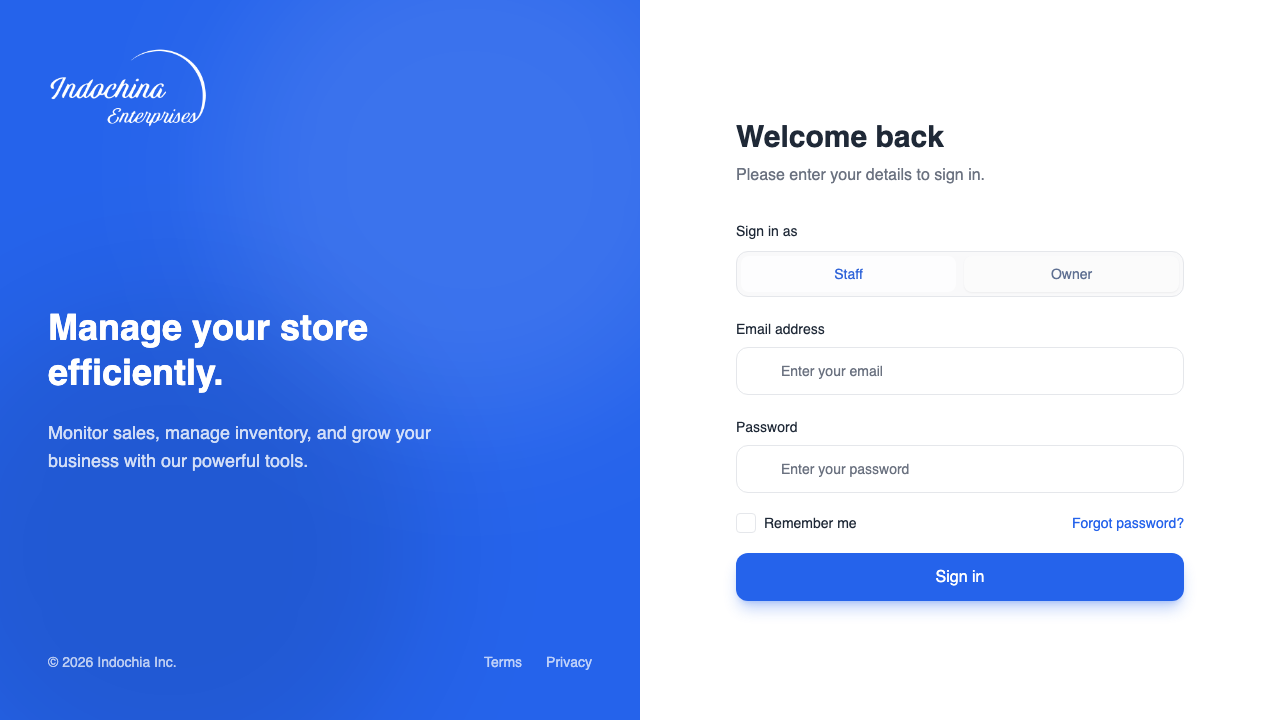
The login page uses react-hook-form + Zod and calls the vendor auth store, which uses vendorLogin in apps/vendor-web/src/services/vendor-auth.api.ts:
POST /auth/vendor/loginwith{ email, password, vendor_type }wherevendor_typeisemployeeorowner(seeVendorLoginKind).POST /auth/vendor/refreshwithrefresh_token.GET /auth/vendor/mefor profile bootstrap (ProtectedRoutetriggersrefreshProfilewhen a token exists).
To refresh the screenshot above from Playwright, see Docs screenshots (Playwright) in Frontend applications.
For token shape and security notes, see Authentication.
Automated test index (sign-in)
Section titled “Automated test index (sign-in)”This subsection is a mirror of automated tests in the repo (names and intent), not a separate manual UAT list. If you add or rename a test, update this table in the same PR.
Playwright — apps/vendor-web/e2e/login.spec.ts
Section titled “Playwright — apps/vendor-web/e2e/login.spec.ts”Suite: Vendor login (test.describe("Vendor login", …)). beforeEach: sets localStorage["i18n-lang"] = "en" so field/validation copy matches the assertions below.
test("…") title | Role / focus | What it checks |
|---|---|---|
owner signs in and dashboard shell is visible | Owner | Clicks Owner, fills owner email/password, expects POST to /api/v1/auth/vendor/login to succeed, URL matches /dashboard, main.main-layout visible. |
staff signs in and dashboard shell is visible | Staff | Clicks Staff, fills employee email/password, same post-login assertions. |
validation: invalid email (client) | Owner | Invalid email string + any password → visible “Enter a valid email address.” → no API alert under form > [role='alert'] → stays on /login. |
validation: empty password (client) | Owner | Valid-shaped email, empty password → “This field is required.” → no API alert → /login. |
API error: wrong password shows banner | Owner | Wrong password → login POST not OK → form > [role='alert'] visible with copy matching Unauthorized / sign in / credentials (regex) → /login. |
Report attachments: each of the tests above calls attachFullPagePng (see e2e/helpers/attach-screenshot.ts). Docs-only capture (not part of this suite): e2e/docs-screenshots.spec.ts when PLAYWRIGHT_UPDATE_DOCS_SCREENSHOTS=1 — see Frontend applications.
Credentials in CI/local: defaults owner@nipos.local / 123123 and employee@nipos.local / 123123 (PLAYWRIGHT_VENDOR_* overrides). Align with AUTH_VENDOR_* / DB rows when DB_ENABLED=true.
Unit tests — backend and frontend
Section titled “Unit tests — backend and frontend”Contract coverage for vendor auth HTTP lives in Nest, for example:
| File | Example it("…") | Relevance |
|---|---|---|
apps/backend/src/modules/vendor/vendor-auth.controller.spec.ts | login delegates to VendorAuthService | Login DTO includes vendor_type (e.g. owner). |
| Same | password-reset routes delegate to VendorAuthService | Request reset → verify OTP → complete reset (mirrors the /forgot-password flow screens, but tested at controller/service level). |
| Same | refresh delegates…, register delegates…, … | Other auth endpoints; see file for the full list. |
For the vendor frontend test policy (unit + e2e + docs screenshot per screen), see Vendor testing and screenshots index. If you add or update auth screens, update that index in the same PR.
Password reset (real API)
Section titled “Password reset (real API)”Same pattern as admin; base path is /api/v1/auth/vendor/password-reset with vendor_type: employee | owner. Client helpers: vendor-password-reset-api.ts with skipAuthHandler: true. Session keys mirror the admin flow. The /verify-otp screen uses one field for the full 6-digit code (paste and one-time-code autofill supported). See Authentication for OTP storage and env vars.
Automated tests: forgot-password / OTP / reset browser E2E coverage is part of the required baseline and should be tracked as explicit entries in Vendor testing and screenshots index. Controller-level coverage already includes password-reset routes delegate to VendorAuthService in vendor-auth.controller.spec.ts (see table above).
Related
Section titled “Related”- Vendor panel overview — RBAC after login.
- Roles (Vendor) — employee module slugs.
- Frontend applications — full vendor route map and E2E.
- Vendor testing and screenshots index — required quality gate for vendor screens.